

- お役立ち記事
- Key points and examples of creating and improving manuals and instructions

Key points and examples of creating and improving manuals and instructions

目次
Understanding the Importance of Manuals and Instructions
Manuals and instructions play a vital role in both personal and professional settings.
They provide detailed guidance on how to operate, assemble, or troubleshoot products and systems.
These documents ensure that users can effectively and safely utilize tools, machines, or processes without the need for external help.
In a business context, well-crafted manuals can also save time and resources by minimizing errors and enhancing productivity.
Key Principles for Creating Effective Manuals
Clarity and Simplicity
One of the most important aspects of a manual is clarity.
Instructions should be straightforward and simple to understand.
Avoid using jargon or overly technical language unless absolutely necessary.
When specialized terms are required, provide clear definitions to aid understanding.
Organization and Structure
An effective manual should be well-organized with a logical structure.
This usually starts with an introduction, followed by step-by-step instructions, and ends with troubleshooting or support information.
Use headings, subheadings, and numbered lists to help guide the reader through the content.
Consistency in Language and Style
Consistent language and style make a manual easier to follow.
Use the same terminology throughout the document to prevent confusion.
For example, if you refer to a piece of equipment as a “device,” continue using that term rather than switching to “machine” or “gadget.”
Visual Aids
Pictures, diagrams, and screenshots can significantly enhance a manual by illustrating complex instructions or concepts.
Visual aids should be clear, labeled appropriately, and directly relevant to the accompanying text.
They can often bridge gaps in understanding that words alone cannot fill.
Common Mistakes in Manual Creation
Lack of User Perspective
A common mistake in manual creation is failing to consider the user’s perspective.
Assume your reader is not familiar with the product or process.
Providing context and anticipating questions can help users feel more confident and avoid potential pitfalls.
Overloading with Information
While it is important to be thorough, overwhelming the reader with too much information at once can be counterproductive.
Stick to essential details and stay focused on the task or subject at hand.
If additional information is necessary, consider providing appendices or referencing additional resources.
Neglecting Updates
Manuals are not static documents.
As products and processes evolve, so too should the instructions that accompany them.
Regularly review and update manuals to ensure they remain accurate and relevant.
Improving Existing Manuals
Gather User Feedback
One of the best ways to improve a manual is by gathering input from the people who use it most.
Feedback can highlight areas that are confusing, missing, or unnecessary.
Conducting surveys or interviews can provide valuable insights for enhancements.
Incorporate New Technologies
As technological capabilities expand, consider incorporating interactive elements such as QR codes, videos, or online support links into your manual.
These tools can offer users immediate assistance or demonstrate procedures visually, further enhancing their understanding.
Streamline Content
Review existing manuals for redundancy or verbosity.
Remove any outdated or unnecessary content.
Streamlining can make the document easier to navigate and quicker for users to find the information they need.
Examples of Effective Manuals
Apple Product Manuals
Apple is renowned for producing user-friendly manuals that reflect their brand’s simplicity and elegance.
Their product manuals are visually appealing and provide clear instructions with helpful images, making it straightforward for users to get started quickly.
IKEA Assembly Instructions
IKEA’s assembly instructions are a great example of using visual aids effectively.
Their manuals rely heavily on diagrams rather than text, allowing users across different language backgrounds to understand assembly processes without language barriers.
Online Software Documentation
Software companies, such as Adobe and Microsoft, offer comprehensive online documentation that combines text, video tutorials, and community forums.
This approach caters to different learning styles, providing multiple ways for users to gather the necessary information.
Conclusion
Creating and improving manuals and instructions is a critical task that requires attention to detail, an understanding of the end-user, and a commitment to clarity.
By following key principles and avoiding common pitfalls, you can produce manuals that not only instruct but also enhance the user experience.
With regular updates and user feedback, these documents can evolve alongside the products and processes they support, ensuring ongoing relevance and utility.
この記事の理解を深める
無料ホワイトペーパーをプレゼント
製造業の現場で使える実務資料(PDF)を無料でお届けします。"こんな資料が届きます" ↓ 下のボタンからどうぞ。
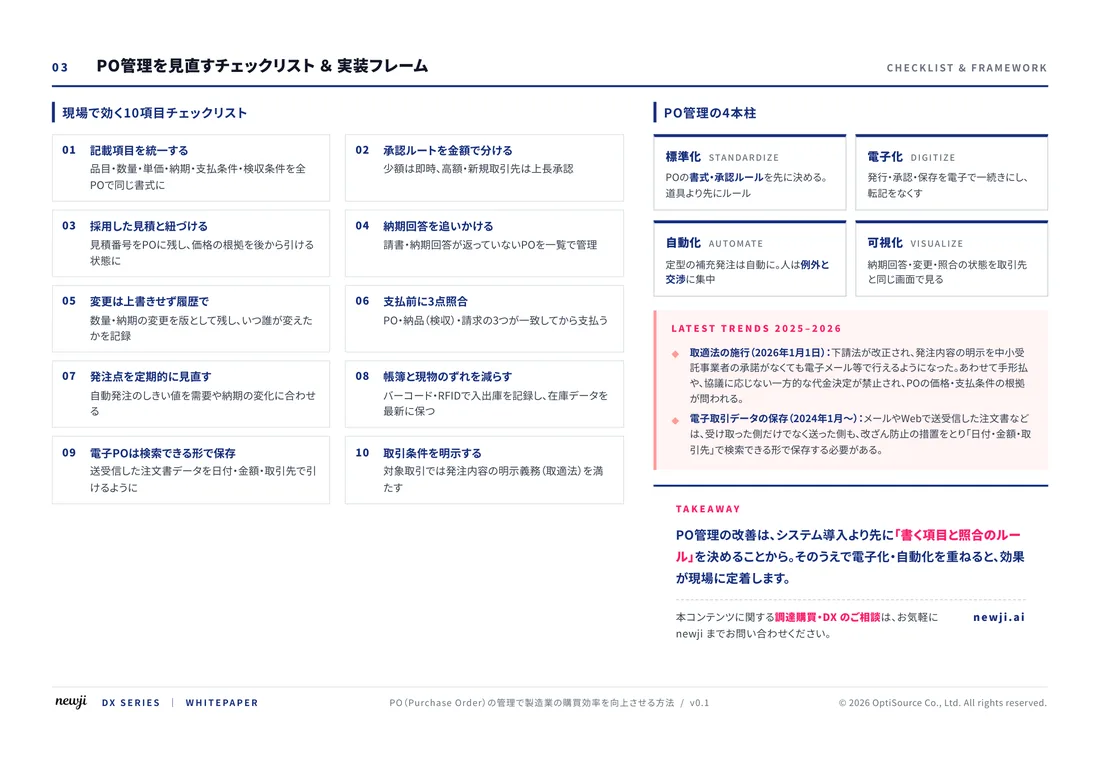
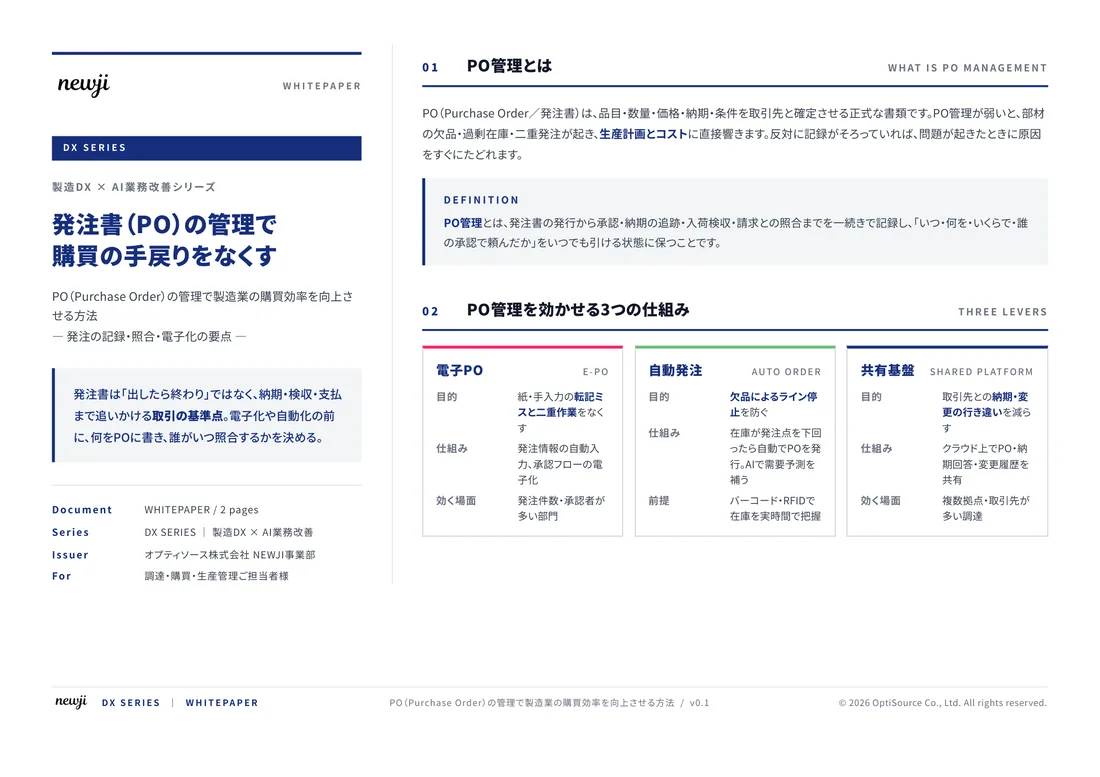
FREE DOCUMENT — サービス資料(PDF・無料)
製造業の見積・受発注クラウド
「Newji one」とは
Newji one は、製造業の調達・受発注に特化したクラウド/AIエージェント。見積依頼・発注書作成・進捗管理・承認をひとつの画面に集約し、AIが比較と異常検知を担当。最後の「GO」だけ人が押す仕組みです。
▶ 製造業の見積・受発注クラウド「Newji one」を、資料で見る(PDF・無料)
- 見積〜発注〜納期を一元管理。催促・転記のムダをゼロに
- AIが相見積もり比較と異常検知。あなたは判断だけに集中
- 取引先は「招待」で完全無料。自社コストだけで取引先ごとデジタル化
※ 取引先から招待された企業様は完全無料でご利用いただけます
関連記事
-

The Fusion of Digital and Reality AR/VR in Manufacturing
-
Improving Customer Satisfaction The Importance of Customization and Flexibility in Manufacturing
-

Digital Workflow in Manufacturing! A Smart Approach to Transform Productivity
-
Reducing Lead Times How to Make Manufacturing Processes More Efficient
-
品質管理自動化はできる?製造業の精度と一貫性の向上
-
製造業におけるAIとロボティクスによる加工技術の変革
 NEWJI総研
 OEM/ODM 生産委託
 AI/DX支援
 見積・発注クラウド Newji one
受発注が増えるほど、入力・確認・催促が重くなる。
受発注管理を“仕組み化“して、ミスと工数を削減しませんか。
見積・発注・納期まで一元管理できます。