

- お役立ち記事
- Basic Python mastering course through practical training
スタートアップから大手まで。
調達・受発注をAIで標準化。
相見積比較も進捗管理もAIが下支え。取引先は招待で完全無料。

Basic Python mastering course through practical training

目次
Introduction to Python Programming
Python is a powerful and popular programming language that’s easy to learn, especially for beginners.
It’s used in various fields, like data science, web development, automation, and more.
In this article, we’ll guide you through a basic Python mastering course focused on practical training.
Getting Started with Python
Installing Python
To begin learning Python, you’ll first need to install it on your computer.
Visit the official Python website (python.org) to download the latest version available for your operating system.
Follow the installation instructions specific to your device, making sure to check the box that adds Python to your system’s PATH during the installation process.
Choosing an Integrated Development Environment (IDE)
An Integrated Development Environment, or IDE, is a software application that provides a comprehensive facility to computer programmers for software development.
There are several popular IDEs you can use for Python programming, such as PyCharm, Visual Studio Code, and Jupyter Notebook.
Choose one that makes you comfortable and offers the features you need.
Running Your First Python Program
With Python installed and an IDE selected, it’s time to write your first Python program.
In your chosen IDE, create a new Python file and type the following code:
“`python
print(“Hello, World!”)
“`
Save the file and run it to see the output.
Congratulations! You’ve just executed your first Python program.
Understanding Python Basics
Variables and Data Types
Variables are storage locations in programming.
Python has several data types, such as integers, floating-point numbers, strings, and booleans.
Assign values to variables like this:
“`python
name = “Alice”
age = 25
is_student = True
“`
Operators
Operators are symbols used to perform operations on variables and values.
Python includes arithmetic operators (like `+`, `-`, `*`, `/`), comparison operators (`==`, `!=`, `>`, `<`), and logical operators (`and`, `or`, `not`).
Control Structures
Control structures direct the flow of execution in a program.
The most common control structures are conditionals and loops.
Here’s an example of a conditional statement in Python:
“`python
if age > 18:
print(“You are an adult.”)
else:
print(“You are a minor.”)
“`
And here’s how you can create a loop using Python:
“`python
for i in range(5):
print(i)
“`
Deepening Your Python Knowledge
Functions
Functions are reusable blocks of code that perform a specific task.
They can accept inputs, known as parameters, and return outputs.
Create a function in Python using the `def` keyword:
“`python
def greet(name):
return “Hello, ” + name + “!”
“`
Call this function with an argument to see it in action:
“`python
print(greet(“Alice”))
“`
Lists and Tuples
Lists and tuples are used to store multiple items in a single variable.
Lists are mutable, meaning you can change their content, while tuples are immutable.
Here’s how to create and manipulate lists and tuples in Python:
“`python
fruits = [“apple”, “banana”, “cherry”]
fruits.append(“orange”)
point = (3, 4)
“`
Dictionaries
Dictionaries hold data in key-value pairs.
They are mutable and allow for fast retrieval of data based on keys.
Here is how you can work with dictionaries in Python:
“`python
student = {
“name”: “Alice”,
“age”: 25,
“courses”: [“Math”, “Science”]
}
print(student[“name”])
“`
Implementing Practical Python Projects
Project 1: Simple Calculator
A simple calculator can be a great way to practice using basic Python operations and functions.
Create a calculator that can add, subtract, multiply, and divide two numbers:
“`python
def calculate(op, a, b):
if op == “+”:
return a + b
elif op == “-“:
return a – b
elif op == “*”:
return a * b
elif op == “/”:
return a / b
else:
return “Invalid operation”
result = calculate(“+”, 10, 5)
print(result)
“`
Project 2: To-Do List Manager
A to-do list manager helps you keep track of your daily tasks.
This project teaches you how to work with lists and functions effectively:
“`python
def add_task(tasks, task):
tasks.append(task)
def show_tasks(tasks):
for idx, task in enumerate(tasks, 1):
print(f”{idx}. {task}”)
to_do_list = []
add_task(to_do_list, “Study Python”)
add_task(to_do_list, “Complete assignments”)
show_tasks(to_do_list)
“`
Project 3: Basic Web Scraper
A basic web scraper can demonstrate how to fetch and process data from websites.
Using a library like BeautifulSoup or requests, you can create a script that extracts information from a web page:
“`python
import requests
from bs4 import BeautifulSoup
def fetch_data(url):
page = requests.get(url)
soup = BeautifulSoup(page.content, ‘html.parser’)
return soup.title.text
website_title = fetch_data(“https://www.python.org”)
print(website_title)
“`
Conclusion
Python is versatile and provides a solid foundation for exploring advanced topics in computer science.
By following this basic Python mastering course through practical training, you’ve learned essential Python concepts and how to apply them in real-world projects.
Continue practicing and expanding your knowledge to become proficient in Python programming.
この記事の理解を深める
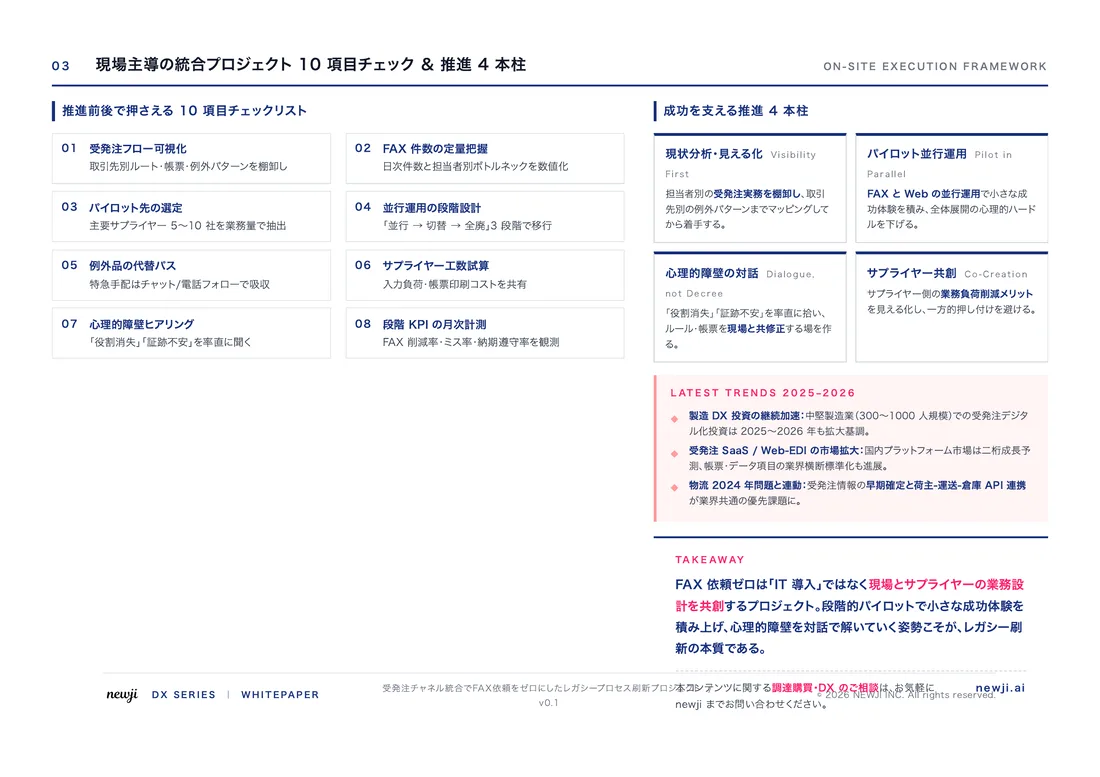
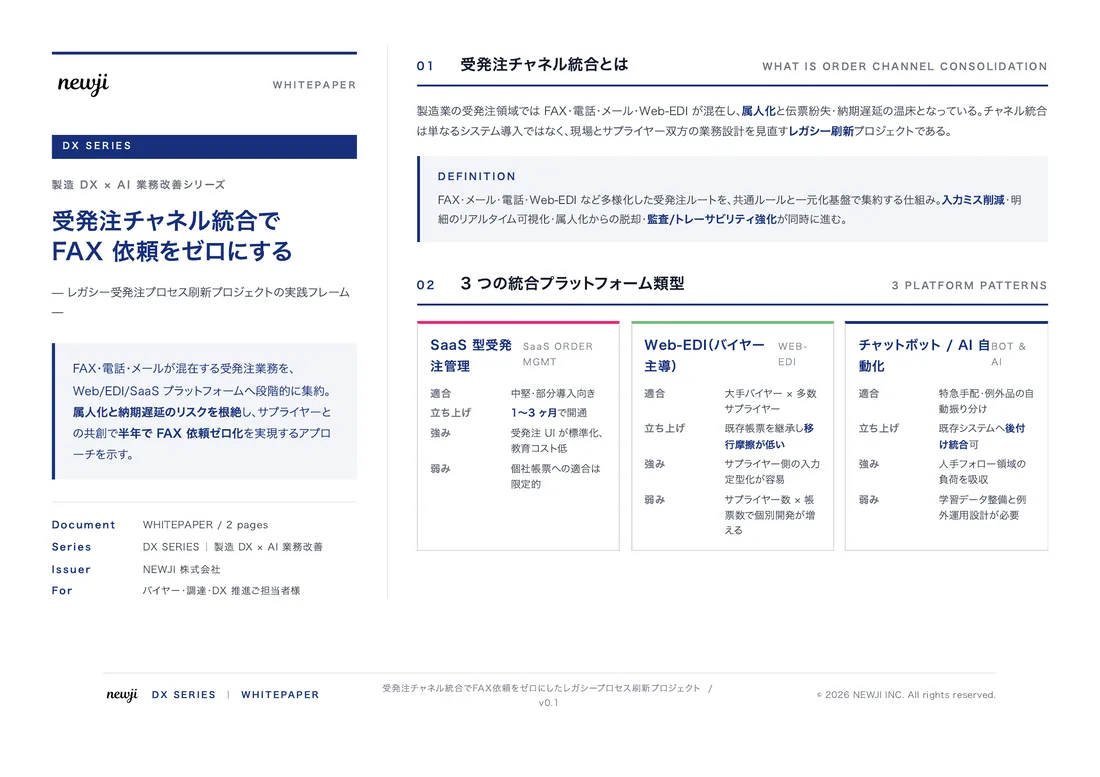
無料ホワイトペーパーをプレゼント
製造業の現場で使える実務資料(PDF)を無料でお届けします。"こんな資料が届きます" ↓ 下のボタンからどうぞ。
PRODUCT — 製造業向け 調達・受発注クラウド
この記事の課題、
newji で解決しませんか?
newji は、製造業の調達・受発注に特化したクラウド/AIエージェント。見積依頼・発注書作成・進捗管理・承認をひとつの画面に集約し、AIが比較と異常検知を担当。最後の「GO」だけ人が押す仕組みです。
- 見積〜発注〜納期を一元管理。催促・転記のムダをゼロに
- AIが相見積もり比較と異常検知。あなたは判断だけに集中
- 取引先は「招待」で完全無料。自社コストだけで取引先ごとデジタル化
※ 取引先から招待された企業様は完全無料でご利用いただけます


 調達購買アウトソーシング
 OEM/ODM 生産委託
 NEWJI DX
 受発注AIエージェント