

- お役立ち記事
- Design method to generate UI ideas
スタートアップから大手まで。
調達・受発注をAIで標準化。
相見積比較も進捗管理もAIが下支え。取引先は招待で完全無料。

Design method to generate UI ideas

目次
Understanding the Basics of UI Design
User Interface (UI) design is an essential component of creating applications and websites that are user-friendly and aesthetically pleasing.
The primary purpose of UI design is to enhance the user experience by making interactions intuitive and efficient.
This involves crafting the look and feel of a digital product, focusing on the overall style and ensuring that your design communicates effectively with users.
To start generating UI ideas, it’s important to grasp the basic principles that guide good UI design.
These include simplicity, consistency, feedback, and responsiveness.
Simplicity ensures that the design isn’t cluttered, allowing users to focus on the core functionality.
Consistency helps in understanding how different parts of the interface relate and function.
Feedback is crucial so that users know their actions have results.
Responsiveness provides a seamless user experience across various devices and screen sizes.
Inspiration Sources for UI Design
Before diving into generating specific UI ideas, it’s essential to gather inspiration.
There are abundant resources available online to draw creativity from.
Design platforms, such as Behance or Dribbble, showcase a plethora of projects from designers worldwide.
These platforms can inspire fresh ideas and help you understand current trends in UI design.
Websites like Awwwards offer collections of some of the best web designs, allowing you to explore different styles and techniques.
Other sources such as Pinterest can provide diverse visual inspiration, from color palettes to functional layouts.
Remember to look beyond digital design and get inspired by the physical world, including art, architecture, and nature.
Inspiration can strike anywhere, so keeping your mind open is crucial to developing innovative UI ideas.
Brainstorming Techniques for UI Ideas
Once you have a sense of direction and inspiration, brainstorming is the next step in generating UI design ideas.
Begin by focusing on the needs and goals of your users.
Understanding user journeys and pain points can significantly inform the design process.
Use brainstorming techniques such as mind maps or sketches to visualize initial ideas.
Another effective technique is the “crazy eights” exercise.
Here, you draw eight quick sketches in eight minutes, encouraging rapid ideation without worrying about perfection.
Affinity diagrams are also useful to organize thoughts and ideas gathered during brainstorming sessions, helping to identify common themes and insights.
Engage with your team in collaborative brainstorming sessions—design is often improved with multiple perspectives.
Be sure to note every idea, no matter how trivial it may seem at first, as the best concepts often come from unexpected places.
Implementing User-Centered Design
A crucial aspect of generating UI ideas is maintaining a user-centered design approach.
This means focusing on the users’ needs and preferences over personal aesthetic desires.
Conducting user research through interviews, surveys, and usability testing will provide invaluable insights into what users truly require.
Create user personas to represent different types of users that might interact with your product.
These personas can guide design decisions and ensure the final product meets diverse user needs.
Wireframing and prototyping using tools like Sketch or Figma can help in quickly iterating designs based on user feedback.
By keeping the design process user-centered, you can ensure that each UI idea aligns with user expectations and enhances overall user satisfaction.
Refining and Testing UI Ideas
Once you have a few UI ideas sketched out, it’s important to refine them—emphasizing what works and eliminating what doesn’t.
At this stage, design critique sessions can be invaluable.
Feedback from peers or potential users can provide different perspectives that help hone the design.
Usability testing is an important part of this refinement process.
This involves evaluating the UI ideas with real users to identify usability issues and areas for improvement.
Regular testing throughout the design process ensures that UI designs remain focused on user needs and expectations.
Utilizing interactive prototypes enables users to experience the design in a more realistic environment, offering more accurate feedback.
Staying Updated with UI Design Trends
Design is dynamic, with trends continually evolving.
Keeping abreast of these changes can inform your UI design ideas and ensure they remain fresh and relevant.
Following blogs, attending design conferences, and participating in webinars are good ways to stay updated on the latest trends in UI design.
Trends like dark mode, voice-activated interfaces, and minimalist design are influencing how UI designers approach projects.
However, it’s vital to balance current trends with timeless user experience principles.
Not every trend will suit every project, and thoughtless application can detract from the user experience.
Use trends as a source of inspiration but always cycle back to the primary objective of meeting user needs effectively.
Conclusion
UI design is a creative process that requires a blend of inspiration, technical skills, and user empathy.
By understanding the basics, finding inspiration, brainstorming creatively, implementing a user-centered approach, and continuously refining your ideas, you can generate effective UI designs that enhance user interaction.
Staying informed about trends and best practices ensures your designs are modern and competitive.
Ultimately, successful UI design hinges on creating interfaces that are intuitive, aesthetically pleasing, and cater to the user’s needs, making their interactions as seamless as possible.
この記事の理解を深める
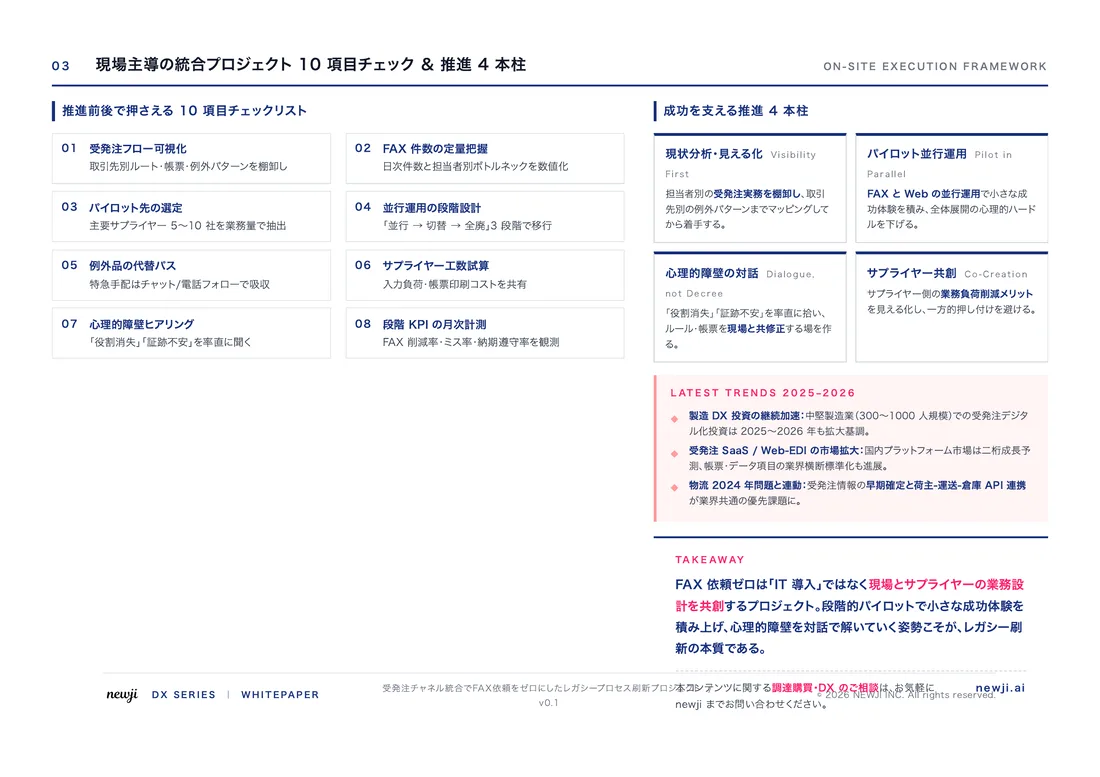
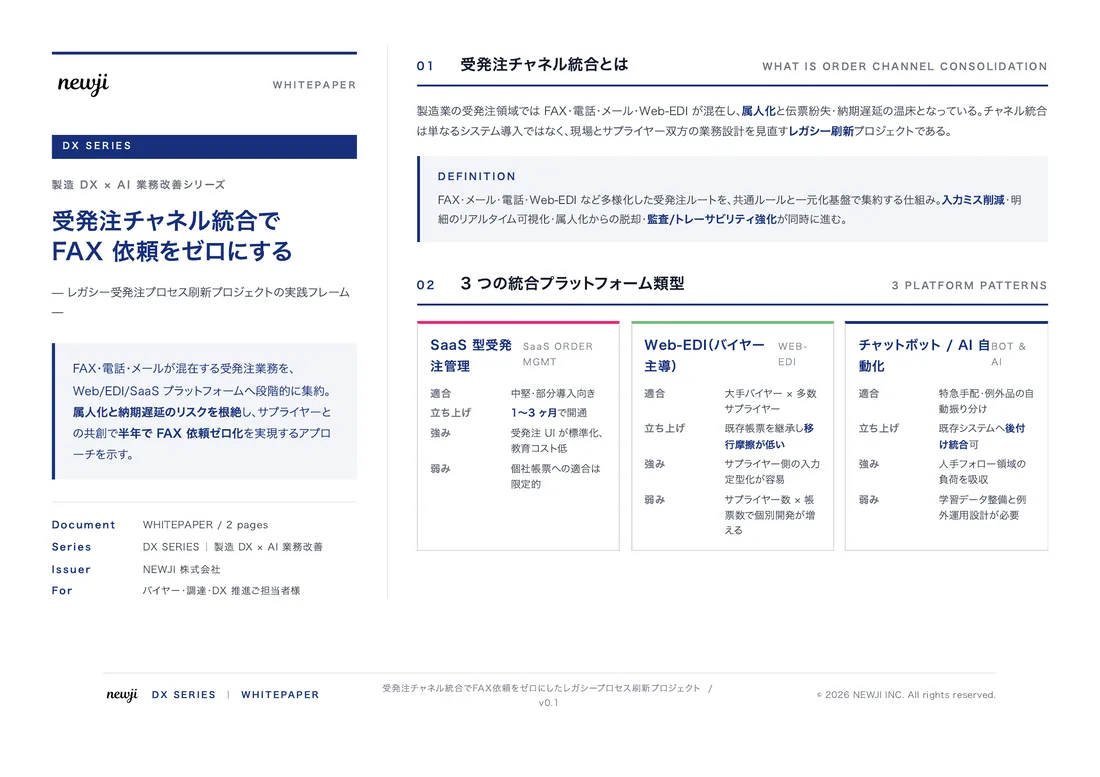
無料ホワイトペーパーをプレゼント
製造業の現場で使える実務資料(PDF)を無料でお届けします。"こんな資料が届きます" ↓ 下のボタンからどうぞ。
PRODUCT — 製造業向け 調達・受発注クラウド
この記事の課題、
newji で解決しませんか?
newji は、製造業の調達・受発注に特化したクラウド/AIエージェント。見積依頼・発注書作成・進捗管理・承認をひとつの画面に集約し、AIが比較と異常検知を担当。最後の「GO」だけ人が押す仕組みです。
- 見積〜発注〜納期を一元管理。催促・転記のムダをゼロに
- AIが相見積もり比較と異常検知。あなたは判断だけに集中
- 取引先は「招待」で完全無料。自社コストだけで取引先ごとデジタル化
※ 取引先から招待された企業様は完全無料でご利用いただけます



 調達購買アウトソーシング
 OEM/ODM 生産委託
 NEWJI DX
 受発注AIエージェント